10 min read#java
Java Basic Syntax
This blog contains some simple exercises on Java basic syntax, continuously updated.
Updated:
阅读中文版JAVA Basics
I. Loops and Branches
- A number is called a "perfect number" if it is exactly equal to the sum of its proper divisors. For example, 6 = 1 + 2 + 3. Write a program to find all perfect numbers within 1000. (Proper divisors: all divisors of the number excluding the number itself)
/**
 * @autor LZH
 * @date 2020/11/1  12:47
 */
      for (int i = 1; i <=1000 ; i++) {
                int sum=0;
                for (int j = 1; j < i; j++) {
                    if (i%j==0){
                       sum+=j;
                }
              }if (sum==i){
                    System.out.println(i);
                }
}- Prime numbers within 100 (numbers divisible only by 1 and themselves, e.g., 2, 3, 5, 7, 11)
/**Basic version
 * @autor LZH
 * @date 2020/11/1  20:47
 */

  public  static void  test1(){
        boolean isFlag=true;//record whether it is a prime number
        for (int i = 2; i <100 ; i++) {
            for (int j = 2; j < i; j++) {
                if (i%j==0){
                    isFlag=false;//if modulo equals 0, it is not a prime number
                    break;//improve efficiency
                }
            }
            if (isFlag==true){
                System.out.println(i);
            }
            isFlag=true;//reset for the next loop
        }
    }
/**Efficient version
 * @autor LZH
 * @date 2020/11/1  20:55
 */
 public  static void  test2(){
        a:for (int i =2; i <100 ; i++) {//iterate from 1 to 100
            for (int j = 2; j <=Math.sqrt(i); j++) {//j: divisor for i
                if (i%j==0){
                    continue a;
                }
            }
            System.out.println(i);
        }
    }
II. Arrays
- Spiral number output
 /**
     * @autor LZH
     * @date 2020/11/2  19:47
     * Spiral array, e.g., input 2, output  1  2
     *                                       4  3
     *  Input 3, output  1 2 3
     *                   8 9 4
     *                   7 6 5
     */
    static void test2(){
        Scanner scanner=new Scanner(System.in);
        int n = scanner.nextInt();
        int arr[][]=new int[n][n];

        int count = 0; // data to display
        int maxX = n - 1; // maximum index on the x-axis
        int maxY = n - 1; // maximum index on the Y-axis
        int minX = 0; // minimum index on the x-axis
        int minY = 0; // minimum index on the Y-axis
        while (minX <= maxX) {
            for (int x = minX; x <= maxX; x++) {
                arr[minY][x] = ++count;
            }
            minY++;
            for (int y = minY; y <= maxY; y++) {
                arr[y][maxX] = ++count;
            }
            maxX--;
            for (int x = maxX; x >= minX; x--) {
                arr[maxY][x] = ++count;
            }
            maxY--;
            for (int y = maxY; y >= minY; y--) {
                arr[y][minX] = ++count;
            }
            minX++;
        }

        for (int i = 0; i < arr.length; i++) {
            for (int j = 0; j < arr.length; j++) {
                System.out.print(arr[i][j]+"\t");
            }
            System.out.println();
        }

    }
III. Multithreading
1. Basic Concepts: Program, Process, Thread
-
Program is a collection of instructions written in a certain language to accomplish a specific task. It refers to a piece of static code, a static object.
-
Process is an execution process of a program, or a program that is currently running. It is a dynamic process: it has its own generation, existence, and termination phases. — Lifecycle, for example:
- A running QQ, a running MP3 player
- Programs are static, processes are dynamic
- A process is the unit of resource allocation; the system allocates different memory regions to each process during runtime.
-
Thread, a process can be further refined into threads, which are execution paths within a program.
- If a process executes multiple threads in parallel at the same time, it supports multithreading.
- A thread is the unit of scheduling and execution. Each thread has its own independent runtime stack and program counter (PC), and the overhead of thread switching is small.
- Multiple threads within a process share the same memory units/memory address space. They allocate objects from the same heap and can access the same variables and objects. This makes communication between threads simpler and more efficient. However, multiple threads operating on shared system resources may pose security risks.
2. Thread Creation and Usage
/**
 *
 *  Method 1: Inherit the Thread class
 * 1. Define a subclass that inherits the Thread class.
 * 2. Override the run method in the Thread class within the subclass.
 * 3. Create an object of the Thread subclass, which creates the thread object.
 * 4. Call the start method of the thread object: starts the thread and invokes the run method.
 *
 * Example: Print even numbers from 1 to 100
 * @Autor LZH
 * @Date 2020/11/13  16:52
 */
class MyThread extends Thread{
    @Override
    public void run() {
        for (int i = 0; i <100 ; i++) {
            if (i%2==0){
                System.out.println(i);
            }
        }
    }
}

public class ThreadTest {
    public static void main(String[] args) {
        MyThread myThread = new MyThread();
        myThread.start();
        System.out.println("----lzhgy.cn----");
    }

}
/**
* Method 2: Implement the Runnable interface
* 1) Define a subclass that implements the Runnable interface.
* 2) Override the run method from the Runnable interface in the subclass.
* 3) Create a thread object using the parameterized constructor of the Thread class.
* 4) Pass the subclass object of the Runnable interface as an actual parameter to the Thread class constructor.
* 5) Call the start method of the Thread class: starts the thread and invokes the run method of the Runnable subclass.
*/
class MyThread2 implements Runnable{
@Override
public void run() {
for (int i = 0; i <100 ; i++) {
if (i%2==0){
System.out.println(i);
}
}
}
}
public class ThreadTest {
public static void main(String[] args) {
MyThread2 myThread2 = new MyThread2();
new Thread(myThread2).start();
System.out.println("----lzhgy.cn----");
}
}/**
* Testing common methods in Thread:
* 1. start(): Starts the current thread; calls the run() of the current thread.
* 2. run(): Usually needs to be overridden in the Thread class, declaring the operations the created thread will perform.
* 3. currentThread(): A static method that returns the thread executing the current code.
* 4. getName(): Gets the name of the current thread.
* 5. setName(): Sets the name of the current thread.
* 6. yield(): Releases the current thread's execution right of the CPU.
* 7. join(): Calling thread b's join() in thread a causes thread a to enter a blocked state until thread b has completely finished, then thread a ends its blocked state.
* 8. stop(): Deprecated. When this method is executed, it forcibly terminates the current thread.
* 9. sleep(long millitime): Makes the current thread "sleep" for the specified millitime milliseconds. During the specified millitime, the current thread is in a blocked state.
* 10. isAlive(): Determines if the current thread is alive.
*
*
* Thread Priority:
* 1.
* MAX_PRIORITY: 10
* MIN _PRIORITY: 1
* NORM_PRIORITY: 5 --> default priority
* 2. How to get and set the priority of the current thread:
* getPriority(): Gets the thread's priority.
* setPriority(int p): Sets the thread's priority.
*
* Note: Higher priority threads will preempt the CPU execution right from lower priority threads. However, this is only probabilistic; higher priority threads have a higher probability of being executed. It does not mean that lower priority threads only execute after higher priority threads have finished.
*
*
* @author lzh
* @create 2020-11-13
*/3. Thread Lifecycle
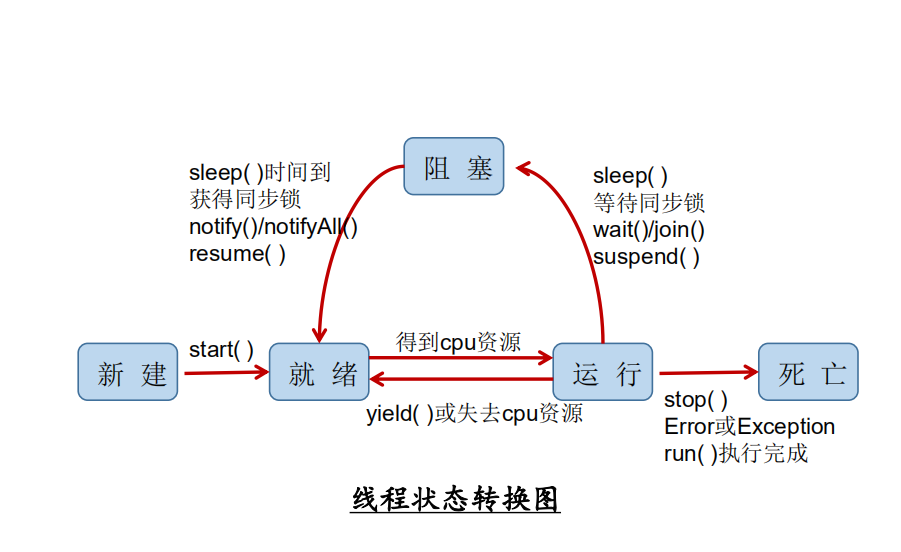
4. Thread Synchronization
/**
 * I. Ways to solve thread safety issues:
 * 1. Synchronized code block:
 * synchronized (object){
 * // code that needs to be synchronized;
 * }
 *
 * 2. synchronized can also be placed in the method declaration, indicating the entire method is a synchronized method.
 * For example:
 * public synchronized void show (String name){
 * ….
 * }
 *
 * 3. Lock lock  --- New in JDK5.0
 *
 *    What are the similarities and differences between synchronized and Lock?
 *   Similarity: Both can solve thread safety issues.
 *   Difference: The synchronized mechanism automatically releases the synchronization monitor after executing the corresponding synchronized code.
 *        Lock requires manually starting synchronization (lock()), and also requires manually ending synchronization (unlock()).
 *
 * II. Recommended order of use:
 * Lock -- Synchronized code block (already entered the method body, allocated corresponding resources) -- Synchronized method (outside the method body)
 *
 * @Autor LZH
 * @Date 2020/12/1  18:03
 */
class Window implements Runnable{

    private int ticket = 100;
    //1. Instantiate ReentrantLock
    private ReentrantLock lock = new ReentrantLock();

    @Override
    public void run() {
        while(true){
            try{

                //2. Call the locking method lock()
                lock.lock();

                if(ticket > 0){

                    try {
                        Thread.sleep(100);
                    } catch (InterruptedException e) {
                        e.printStackTrace();
                    }

                    System.out.println(Thread.currentThread().getName() + ":Selling ticket, ticket number:" + ticket);
                    ticket--;
                }else{
                    break;
                }
            }finally {
                //3. Call the unlocking method: unlock()
                lock.unlock();
            }

        }
    }
}

public class LockTest {
    public static void main(String[] args) {
        Window w = new Window();

        Thread t1 = new Thread(w);
        Thread t2 = new Thread(w);
        Thread t3 = new Thread(w);

        t1.setName("Window 1");
        t2.setName("Window 2");
        t3.setName("Window 3");

        t1.start();
        t2.start();
        t3.start();
    }
}
5. Thread Communication
/**
 *  Application of thread communication: Classic example: Producer/Consumer problem
 *  *
 *  * The Producer hands products to the Clerk, and the Consumer takes products from the Clerk.
 *  * The Clerk can only hold a fixed number of products at a time (e.g., 20). If the producer tries to produce more products,
 *  * the clerk will ask the producer to stop and notify the producer to continue when there is space. If there are no products
 *  * in the store, the clerk will tell the consumer to wait and notify the consumer to pick up products when they are available.
 *  *
 *  * Analysis:
 *  * 1. Is it a multithreading problem? Yes, producer thread, consumer thread.
 *  * 2. Is there shared data? Yes, the clerk (or products).
 *  * 3. How to solve the thread safety problem? Synchronization mechanism, there are three methods.
 *  * 4. Does it involve thread communication? Yes.
 * @Autor LZH
 * @Date 2020/12/1  19:03
 */
public class ProductTest {

    public static void main(String[] args) {
        Clerk clerk=new Clerk();

        Producer p=new Producer(clerk);
        Thread p1=new Thread(p);
        p1.setName("Producer 1");

        Consumer c=new Consumer(clerk);
        Thread c1=new Thread(c);
        Thread c2=new Thread(c);
        c1.setName("Consumer 1");
        c2.setName("Consumer 2");

        p1.start();
        c1.start();
        c2.start();
    }
}
class Clerk{
    private  static int productCount=0;
    //Produce product
    public synchronized void produceProduct() {
        if (productCount<20){
            ++productCount;
            System.out.println(Thread.currentThread().getName()+": Starting production of product number "+productCount);
            notify();//wake up consumer
        }else {
            try {
                wait();
            } catch (InterruptedException e) {
                e.printStackTrace();
            }
        }
    }

    public synchronized void consumeProduct() {
        if (productCount>0){
            System.out.println(Thread.currentThread().getName()+": Starting consumption of product number "+productCount);
            productCount--;
            notify();
        }else {
            try {
                wait();
            } catch (InterruptedException e) {
                e.printStackTrace();
            }

        }
    }
}
//Producer
class Producer implements Runnable{

    private Clerk clerk;

    public Producer(Clerk clerk) {
        this.clerk = clerk;
    }

    @Override
    public void run() {
        System.out.println(Thread.currentThread().getName()+" Starting production..");
        while (true){
            clerk.produceProduct();
            try {
                Thread.sleep(100);
            } catch (InterruptedException e) {
                e.printStackTrace();
            }
        }
    }
}
class Consumer implements Runnable{

    private Clerk clerk;

    public Consumer(Clerk clerk) {
        this.clerk = clerk;
    }
    @Override
    public void run() {
        System.out.println(Thread.currentThread().getName()+" Starting consumption");

        while (true){
            clerk.consumeProduct();
            try {
                Thread.sleep(200);
            } catch (InterruptedException e) {
                e.printStackTrace();
            }
        }
    }
}
6. New Thread Creation Methods in JDK5.0
/**
 * Method 3 for creating threads: Implement the Callable interface. --- New in JDK 5.0
 *
 *
 * How to understand that creating multithreading by implementing the Callable interface is more powerful than creating multithreading by implementing the Runnable interface?
 * 1. call() can have a return value.
 * 2. call() can throw exceptions, which can be caught by external operations to get exception information.
 * 3. Callable supports generics.
 *
 * @author lzh
 * @create 2020-12-2
 */
//1. Create an implementation class that implements Callable
class NumThread implements Callable{
    //2. Implement the call method, declaring the operations the thread needs to perform in call()
    @Override
    public Object call() throws Exception {
        int sum = 0;
        for (int i = 1; i <= 100; i++) {
            if(i % 2 == 0){
                System.out.println(i);
                sum += i;
            }
        }
        return sum;
    }
}


public class ThreadNew {
    public static void main(String[] args) {
        //3. Create an object of the Callable interface implementation class
        NumThread numThread = new NumThread();
        //4. Pass this Callable interface implementation class object to the FutureTask constructor to create a FutureTask object
        FutureTask futureTask = new FutureTask(numThread);
        //5. Pass the FutureTask object as a parameter to the Thread class constructor, create a Thread object, and call start()
        new Thread(futureTask).start();

        try {
            //6. Get the return value of the call method in Callable
            //The get() return value is the return value of the call() overridden by the Callable implementation class which is the FutureTask constructor parameter.
            Object sum = futureTask.get();
            System.out.println("Total sum:" + sum);
        } catch (InterruptedException e) {
            e.printStackTrace();
        } catch (ExecutionException e) {
            e.printStackTrace();
        }
    }

}
/**
 * Method 4 for creating threads: Using thread pools
 *
 * Benefits:
 * 1. Improved response speed (reduces the time to create new threads)
 * 2. Reduced resource consumption (reuses threads in the pool, no need to create every time)
 * 3. Facilitates thread management
 *      corePoolSize: The size of the core pool
 *      maximumPoolSize: The maximum number of threads
 *      keepAliveTime: The maximum time a thread will remain alive without tasks before terminating
 *
 * @author lzh
 * @create 2020-12-2
 */

class NumberThread implements Runnable{

    @Override
    public void run() {
        for(int i = 0;i <= 100;i++){
            if(i % 2 == 0){
                System.out.println(Thread.currentThread().getName() + ": " + i);
            }
        }
    }
}

class NumberThread1 implements Runnable{

    @Override
    public void run() {
        for(int i = 0;i <= 100;i++){
            if(i % 2 != 0){
                System.out.println(Thread.currentThread().getName() + ": " + i);
            }
        }
    }
}

public class ThreadPool {

    public static void main(String[] args) {
        //1. Provide a thread pool with a specified number of threads
        ExecutorService service = Executors.newFixedThreadPool(10);
        ThreadPoolExecutor service1 = (ThreadPoolExecutor) service;
        //Set thread pool properties
//        System.out.println(service.getClass());
//        service1.setCorePoolSize(15);
//        service1.setKeepAliveTime();


        //2. Execute the specified thread operations. Need to provide objects implementing the Runnable interface or Callable interface
        service.execute(new NumberThread());//Suitable for Runnable
        service.execute(new NumberThread1());//Suitable for Runnable

//        service.submit(Callable callable);//Suitable for Callable
        //3. Shut down the connection pool
        service.shutdown();
    }

}
Comments(0)