Flink Async I/O
Usage of Async I/O in Flink
Updated:
阅读中文版Flink Async I/O
The Need for Async I/O Operations
When interacting with external systems (enriching stream data with data from a database), it is necessary to consider the impact of communication latency with the external system on the entire stream processing application.
Simply accessing data from an external database, for example using a MapFunction, typically means synchronous interaction: the MapFunction sends a request to the database and then waits until a response is received. In many cases, waiting occupies the majority of the function's execution time.
Asynchronous interaction with a database means that a single parallel function instance can concurrently process multiple requests and receive multiple responses. This way, while the function is waiting, it can send other requests and receive other responses. At the very least, the waiting time can be amortized across multiple requests. In most cases, asynchronous interaction can significantly improve the throughput of stream processing.
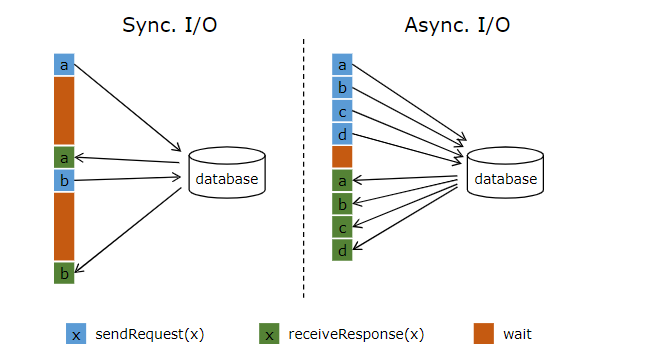
Note: Simply increasing the parallelism of the MapFunction can also improve throughput in some cases, but doing so often leads to very high resource consumption: more parallel MapFunction instances mean more Tasks, more threads, more internal Flink network connections, more network connections to the database, more buffering, and more overhead for internal program coordination.
Prerequisites
As mentioned in the previous section, correctly implementing asynchronous I/O interaction with a database (or key/value store) requires a database client that supports asynchronous requests. Many mainstream databases provide such clients.
If such a client is not available, it is possible to convert a synchronous client into a limited-concurrency client by creating multiple clients and using a thread pool to handle synchronous calls. However, this approach is generally less efficient than a proper asynchronous client.
Async I/O API
Flink's Async I/O API allows users to use asynchronous request clients in stream processing. The API handles integration with the data stream while also properly managing ordering, event time, and fault tolerance.
With an asynchronous database client in place, implementing asynchronous I/O interaction between a data stream transformation operation and the database requires the following three parts:
- An
AsyncFunctionthat dispatches requests - A callback function that obtains the result of the database interaction and sends it to the
ResultFuture - Applying the async I/O operation to the
DataStreamas a transformation operation on theDataStream.
Below is a basic code template:
// This example uses the Java 8 Future interface (which is the same as Flink's Future) to implement asynchronous requests and callbacks.

/**
 * Implement 'AsyncFunction' to send requests and set callbacks.
 */
class AsyncDatabaseRequest extends RichAsyncFunction<String, Tuple2<String, String>> {

    /** Database client that can send requests concurrently using callback functions */
    private transient DatabaseClient client;

    @Override
    public void open(Configuration parameters) throws Exception {
        client = new DatabaseClient(host, post, credentials);
    }

    @Override
    public void close() throws Exception {
        client.close();
    }

    @Override
    public void asyncInvoke(String key, final ResultFuture<Tuple2<String, String>> resultFuture) throws Exception {

        // Send the asynchronous request and receive the future result
        final Future<String> result = client.query(key);

        // Set the callback function to be executed when the client completes the request
        // The callback function simply sends the result to the future
        CompletableFuture.supplyAsync(new Supplier<String>() {

            @Override
            public String get() {
                try {
                    return result.get();
                } catch (InterruptedException | ExecutionException e) {
                    // Handle the exception explicitly.
                    return null;
                }
            }
        }).thenAccept( (String dbResult) -> {
            resultFuture.complete(Collections.singleton(new Tuple2<>(key, dbResult)));
        });
    }
}

// Create the initial DataStream
DataStream<String> stream = ...;

// Apply the async I/O transformation operation
DataStream<Tuple2<String, String>> resultStream =
    AsyncDataStream.unorderedWait(stream, new AsyncDatabaseRequest(), 1000, TimeUnit.MILLISECONDS, 100);
Important Note: The ResultFuture is completed after the first call to ResultFuture.complete. Subsequent calls to complete will be ignored.
The following two parameters control the asynchronous operation:
- Timeout: The timeout parameter defines how long an asynchronous request can go without a response before it is considered failed. It prevents waiting indefinitely for requests that never receive a response.
- Capacity: The capacity parameter defines the number of asynchronous requests that can be in progress simultaneously. Even though async I/O typically brings higher throughput, the operator performing the async I/O operation can still become a bottleneck in stream processing. Limiting the number of concurrent requests ensures that the operator does not continuously accumulate pending requests and cause backpressure, but rather triggers backpressure when capacity is exhausted.
Timeout Handling
When an async I/O request times out, by default an exception is thrown and the job is restarted. If you want to handle timeouts, you can override the AsyncFunction#timeout method.
Order of Results
Concurrent requests issued by the AsyncFunction often complete in an indeterminate order, depending on the order in which responses are received. Flink provides two modes to control the order in which result records are emitted.
- Unordered mode: Result records are emitted as soon as an asynchronous request completes. The order of records in the stream changes after passing through the async I/O operator. When using processing time as the base time characteristic, this mode has the lowest latency and least overhead. This mode uses the
AsyncDataStream.unorderedWait(...)method. - Ordered mode: This mode preserves the order of the stream. The order in which result records are emitted is the same as the order in which the asynchronous requests were triggered (the order records entered the operator). To achieve this, the operator buffers a result record until all records preceding it have been emitted (or have timed out). Because records or results need to be kept in checkpoint state for a longer period, ordered mode typically introduces some additional latency and checkpoint overhead compared to unordered mode. This mode uses the
AsyncDataStream.orderedWait(...)method.
Event Time
When a stream processing application uses event time, the async I/O operator handles watermarks correctly. For both ordering modes, this means the following:
-
Unordered mode: Watermarks neither precede nor lag behind records, meaning watermarks establish sequential boundaries. Only records between two consecutive watermarks are emitted out of order. Records generated after a watermark will only be emitted after that watermark has been emitted. A watermark is emitted only after all result records for all inputs before that watermark have been emitted.
This means that in the presence of watermarks, unordered mode introduces some of the same latency and management overhead as ordered mode. The overhead depends on the frequency of the watermarks.
-
Ordered mode: The order of records between two consecutive watermarks is also preserved. There is no significant difference in overhead compared to using processing time.
Remember that ingestion time is a special form of event time that automatically generates watermarks based on the processing time of the data source.
Fault Tolerance Guarantees
The async I/O operator provides full exactly-once fault tolerance guarantees. It stores the records of in-flight asynchronous requests in checkpoints and re-triggers the requests upon failure recovery.
Implementation Tips
When implementing Futures that use an Executor (or ExecutionContext in Scala) and callbacks, it is recommended to use a DirectExecutor, because the callback workload is typically very small, and DirectExecutor avoids the overhead of additional thread switching. The callback typically just sends the result to the ResultFuture, which means adding it to the output buffer. From there, the heavy logic, including sending records and interacting with checkpoints, is handled in a dedicated thread pool.
DirectExecutor can be obtained via org.apache.flink.runtime.concurrent.Executors.directExecutor() or com.google.common.util.concurrent.MoreExecutors.directExecutor().
Caveats
Flink does not call AsyncFunction in a multi-threaded manner
We want to clearly point out a common point of confusion here: the AsyncFunction is not invoked in a multi-threaded manner. There is only one AsyncFunction instance, and it is called sequentially for each record in the corresponding partition of the stream. Unless the asyncInvoke(...) method returns quickly and relies on (the client's) callbacks, proper async I/O cannot be achieved.
For example, the following situations cause a blocking asyncInvoke(...) function, thereby invalidating the asynchronous behavior:
- Using a synchronous database client whose query method call blocks until a result is returned.
- Blocking inside the
asyncInvoke(...)method while waiting for a future-type object returned by the asynchronous client.
Currently, for consistency reasons, the AsyncFunction operator (the async wait operator) must be at the head of the operator chain
For the reasons given in FLINK-13063, we currently must break the operator chain of the async wait operator to prevent potential consistency issues. This changes the behavior of previously supported operator chaining. Users who want the old behavior and accept potentially violating consistency guarantees can instantiate and manually add the async wait operator to the job graph and set the chaining strategy back to linking via the ChainingStrategy.ALWAYS method on the async wait operator.
Comments(0)